How to install and configure SNMP in CentOS 7
First of all, execute this command to download the SNMP module
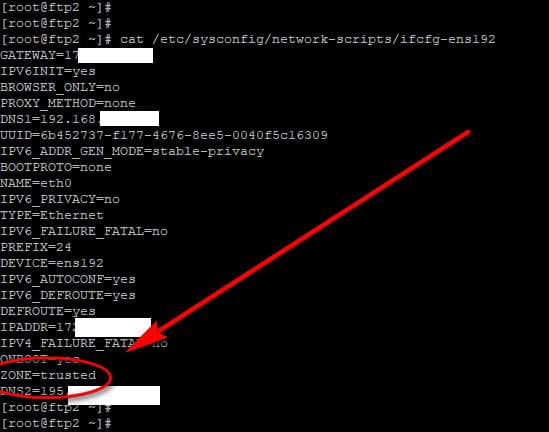
sudo yum -y install net-snmp net-snmp-utilsOnce the SNMP protocol is installed, execute this command and look for the line ZONE
cat /etc/sysconfig/network-scripts/ifcfg-ens192
The ZONE should be on "trusted"
After verifying that, execute these commands to add the appropriate firewall rules. As you probably know SNMP protocol uses both ports 161 and 162 in order to function properly. UDP port 161 is used by the SNMP Agent for sending and receiving requests while port 162 is used by the SNMP Manager for receiving trap and managing the devices
SNMP uses the UDP port 161 of the SNMP Agent for sending and receiving requests, and port 162 of the SNMP Manager for receiving traps from managed devices. Every de
firewall-cmd --zone=trusted --add-port=161/udp --permanent
firewall-cmd --zone=trusted --add-port=161/tcp --permanent
firewall-cmd --zone=trusted --add-port=162/udp --permanent
firewall-cmd --zone=trusted --add-port=162/tcp --permanent
firewall-cmd --reload
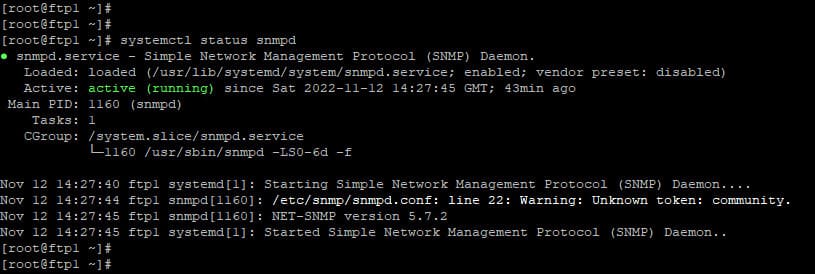
Jumping now into the SNMP configuration, issue this command to ensure that the SNMP protocol that installed previously is working fine
systemctl status snmpdYou should see an output like this, (running) on green, hoho
Then edit the configuration file by entering this other command:
Comments powered by CComment